Barycentric and bilinear image interpolation in pure Python
Overview
Currently imin repository contains code for barycentric and bilinear image interpolation using pure Python. Free-threaded Python is highly recommended.
[!WARNING]
The code is evolutionary structured (i.e. hard to understand), sparingly documented, und highly dangerous! © Professor Professor.
Bilinear image interpolation works by considering pixel as ⬛ square, and performing interpolation between four corners.
Barycentric image interpolation, the most interesting part of the module, works by dividing ⬛ pixel square onto either ◤◢ or ◣◥ subtriangles, and performing interpolation within a triangle using barycentric coordinates.
Functional branch
This branch, “Functional”, specifically, contain imin module version to be used as functions, not classes, and several shell applications to show the module in action. Imin version designed as a class is contained in “Objectable” branch.
Figures
Some illustrations of difference between bilinear and barycentric interpolation are given below.
| Source | Bilinear interpolation | Barycentric interpolation |
|---|---|---|
 |
 |
 |
| Source image 3x3 px | Bilinear upscale x20 times | Barycentric upscale x20 times |
Above you can see an example of upscaling a single black pixel over white background 20 times. Surely 20 times figure is impractical, but gives a good illustration of interpolation methods.
| Source | Bilinear interpolation | Barycentric interpolation |
|---|---|---|
 |
 |
 |
| Source image 22x16 px | Bilinear upscale x5 times | Barycentric upscale x5 times |
Above you can see an example of upscaling a photo fragment 5 times. It seems that barycentric interpolation produces clearer general eye shape appearance, but turns single pixel pupil into rhomb, while bilinear interpolation simply blurs everything.
Files
Module imin
__init__.py: This is not just an init file. Actually, it contains all code required to read image pixel at float coordinates, interpolated from surrounding pixels using either barycentric or bilinear method. If reading image pixels is all you need, you may copy__init__.pyfile alone and use it for your applications. Remember that I don’t give a care to legal stuff, so you can use my code for free, completely or partially, and modify at will.displace.py: General purpose image displacement using either barycentric or bilinear interpolation. Exact type of displacement is controlled by fx(x, y) and fy(x, y) functions, given todisplaceas arguments.rescale.py: Image rescaling. Obviously, image rescaling is a specific case of displacement, and can be done with displacer, but specific case of rescaling gives a chance to add some specific speed optimization; therefore a separate code was created.
Instructions for developers on module usage and function input syntax are given in a rather prolific docstrings. Also, you may always take a look at the source of sample GUI shell applications, listed below.
Shell applications
-
mdbiggener.py: image rescaler; provides a demo forrescale.py;Fig. 1. Image rescaler with configurable interpolation 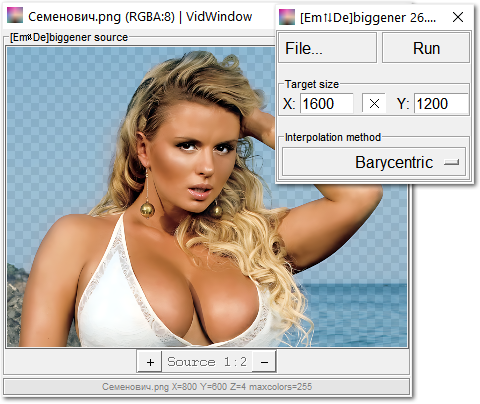
Sample program “Em⇅Debiggener”. GUI is rather compact yet provides some suitable features. For example, with mouse over numerical input fields you can use mouse wheel to gradually increment/decrement input values. Mouse over info string below image shows you last filter execution time (and Ctrl+Click on it places this value to clipboard. This was made to simplify speed tests during optimization). -
distorter.py: the main part of demo. Distorter provides examples of using general purpose image displacer (displace.py) with various algorithmic displacement functions. Currently demo includes a few functions:- skewing (tangent based);
- wavy distortion (sine based);
- a couple of toothy distortions (modulo based).
Fig. 2. Image displacement in “wrap around” mode, using barycentric image interpolation 
Sample program “Dist◇rter”, performing arbitrary image displacement in “wrap around” mode, using barycentric image interpolation. -
revolver.py: image rotation program. Based entirely ondisplace.py, and separated as specific program just because rotation GUI should take only one argument (i.e. angle), while displacement currently takes two (one for x and other for y). To avoid making a program with only half of GUI being functional, this particular example program was created.
Shell programs GUI provides whole set of interpolation options; however, they do not always work as one may expect. For example, “Wrap around” processing for seamless textures in “Distorter” works for wave deformation, but makes seams for skewing. This is caused by skewing nature: opposite image borders slide against each other, thus breaking seamless borders match. Please remember that these shell programs are made for module testing and illustration purposes, and not as a complete replacement for Photoshop or GIMP.
Prerequisite and Dependencies
- Python 3.11 or above. Note that during November 2026 module was rewritten to support multithreading, which provides dramatic speed increase when running under free-threaded (no GIL) Python; therefore using modern versions, like Python 3.14 and above, is highly recommended.
- PyPNG. Required for PNG images reading and writing. Copy included into current imin distribution.
- PyPNM. Required for viewing image data, as well as PPM and PGM images reading and writing. Copy included into current imin distribution.
- Tkinter. Normally included into standard CPython distribution.
Links
Barycentric and bilinear image interpolation explanatory page with illustrations
Barycentric and bilinear image interpolation source code at Github
Barycentric and bilinear image interpolation source code at Gitflic mirror
The Toad’s Slimy Mudhole website - more Python freeware for 2D image processing, POV-Ray and other 3D, and batch automation by the same author.